
Xác thực 3DS
Bahn SDK sử dụng luồng thử thách 3D Secure v2 tự lưu trữ (self-hosted) — không phụ thuộc vào CDN bên ngoài.
Trang này mô tả cách xử lý một thử thách (challenge) trên trình duyệt sau khi nó được kích hoạt. Để kiểm soát liệu 3DS có chạy hay không — tùy chọn request_three_d_secure phía server — xem Kiểm soát 3DS.
Hành vi 3DS trong Sandbox
Trong môi trường sandbox, luồng 3DS phụ thuộc vào số tiền thanh toán (VND):
| Số tiền | Kết quả 3DS |
|---|---|
| < 2.000.000 VND | Frictionless — 3DS tự động pass, không hiển thị thử thách |
| 2.000.000 – 5.000.000 VND | Challenge — luồng thử thách 3DS đầy đủ được kích hoạt |
| > 5.000.000 VND | Rejected — giao dịch bị từ chối |
Sử dụng các ngưỡng này để kiểm thử cả ba kết quả 3DS trong sandbox trước khi lên production.
bahn.mount3DS(sessionId, callbacks, options?)
Gắn (mount) modal thử thách 3DS.
bahn.mount3DS(
  threeDsPayload.id,
  {
    onReady: () => console.log("3DS challenge loaded"),
    onSuccess: () => console.log("3DS authentication passed"),
    onFailure: (error) => console.error("3DS failed:", error.code, error.message),
  },
  { container: "#tds-wrapper" }
);
Tham số:
| Tham số | Kiểu | Bắt buộc | Mặc định | Mô tả |
|---|---|---|---|---|
sessionId | string | Có | — | ID phiên 3DS lấy từ payload đã giải mã |
callbacks.onReady | () => void | Không | — | Kích hoạt khi giao diện 3DS đã được gắn và sẵn sàng |
callbacks.onSuccess | () => void | Có | — | Thử thách 3DS thành công |
callbacks.onFailure | (error?) => void | Có | — | Thử thách 3DS thất bại |
options | ThreeDSecureOptions | Không | — | Các tùy chọn thử thách (selector container, v.v.) |
ThreeDSCallbacks
interface ThreeDSCallbacks {
  onReady?: () => void;
  onSuccess: () => void;
  onFailure: (error?: ComponentError | Record<string, unknown>) => void;
}
Đối tượng error truyền vào onFailure bao gồm:
| Trường | Kiểu | Mô tả |
|---|---|---|
code | string | Mã lỗi có thể đọc bằng máy |
message | string | Mô tả lỗi có thể đọc được bởi con người |
Mã lỗi 3DS
error.code truyền vào onFailure là một trong các chuỗi kebab-case dưới đây (ví dụ "challenge-failed").
Giá trị error.code | Thông báo mặc định |
|---|---|
boot-failed | Giao diện 3DS khởi tạo thất bại. Vui lòng thử lại. |
frame-load-error | Giao diện 3DS tải thất bại. Vui lòng kiểm tra kết nối và thử lại. |
session-complete | Phiên 3DS này đã hoàn tất. Không cần thao tác thêm. |
session-not-found | Không tìm thấy phiên 3DS. Vui lòng đảm bảo bạn đang sử dụng session ID hợp lệ. |
session-unknown-error | Đã xảy ra lỗi không mong muốn khi giao tiếp với dịch vụ 3DS. |
challenge-failed | Ngân hàng phát hành thẻ không thể xác minh giao dịch này. Vui lòng thử phương thức thanh toán khác. |
challenge-cancelled | Việc xác minh đã bị hủy. |
challenge-aborted | Cần xác minh bổ sung nhưng đã bị bỏ qua bởi cấu hình thanh toán của bạn. |
something-went-wrong | Đã có lỗi xảy ra. Vui lòng thử lại. |
Switch theo mã lỗi:
bahn.mount3DS(sessionId, {
  onSuccess: () => {},
  onFailure: (error) => {
    switch (error?.code) {
      case "challenge-cancelled":
        showMessage("You cancelled verification. Please try again.");
        break;
      case "challenge-failed":
        showMessage("Your bank could not verify this card. Try another card.");
        break;
      default:
        showMessage(error?.message ?? "3DS authentication failed.");
    }
  },
});
Gỡ bỏ (unmounting)
Modal sẽ tự động gỡ bỏ khi thử thách đạt trạng thái cuối (thành công hoặc thất bại). Để đóng sớm, gọi unmount() trên component được trả về từ mount3DS():
const tds = bahn.mount3DS(sessionId, callbacks);
// sau đó, ví dụ khi người dùng hủy
tds.unmount();
Modal thử thách
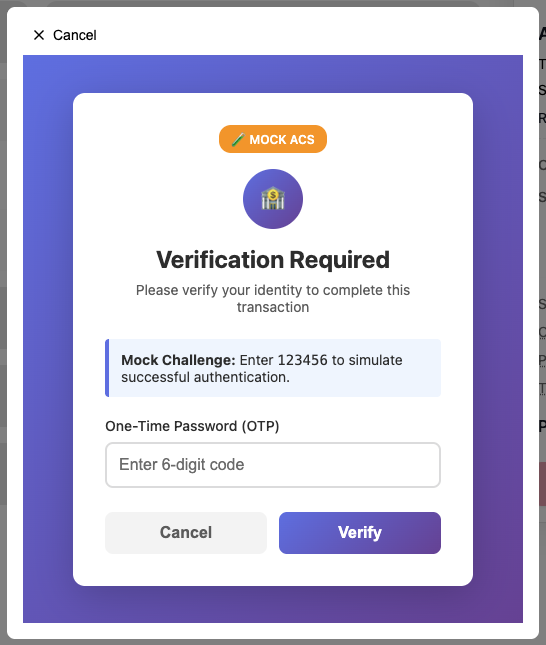
Modal này được hiển thị bởi iframe 3DS tự lưu trữ và được gắn vào options.container (hoặc vào document body nếu không truyền). Không có script bên ngoài nào được tải.
Sơ đồ luồng 3DS
sequenceDiagram
    participant App as Your App
    participant SDK as Bahn SDK
    participant Iframe as 3DS Iframe
    participant ACS as Issuer ACS

    App->>SDK: confirmPayment(payload)
    SDK-->>App: { payment_intent, three_ds_payload }

    Note over App: three_ds_payload present → 3DS required

    App->>SDK: mount3DS(sessionId, callbacks)
    SDK->>Iframe: Load 3DS challenge
    Iframe->>ACS: Challenge request
    ACS-->>Iframe: Challenge HTML
    Iframe->>ACS: User completes challenge
    ACS-->>Iframe: Challenge result

    alt Challenge passed
        Iframe-->>SDK: success
        SDK-->>App: callbacks.onSuccess()
        App->>SDK: pollPaymentIntentStatus(clientSecret)
    else Challenge failed
        Iframe-->>SDK: failure
        SDK-->>App: callbacks.onFailure({ code, message })
    end
Cách dùng thông thường với confirmPayment
Ví dụ đầy đủ
Một trang thanh toán hoàn chỉnh có 3DS: Ví dụ tích hợp → Xác nhận thanh toán.
// client_secret đến từ backend của bạn (tạo payment intent phía server)
const { payment_intent, three_ds_payload } = await bahn.confirmPayment({ client_secret });

if (three_ds_payload) {
  bahn.mount3DS(three_ds_payload.id, {
    onSuccess: () => {
      // 3DS đã pass — poll trạng thái thanh toán cuối cùng
      bahn.pollPaymentIntentStatus(client_secret, {
        onProgress: (attempt, max, status) =>
          console.log(`Polling: ${attempt}/${max} — ${status}`),
        onSuccess: (pi) => redirectToSuccess(pi),
        onFailure: (pi) => redirectToFailure(pi),
        onTimeout: () => showTimeoutError(),
        onError: (err) => console.error("Poll error:", err),
      });
    },
    onFailure: (err) => {
      showError(`3DS failed: ${err?.message || "Unknown error"}`);
    },
  });
} else {
  // Không cần 3DS — payment intent đã sẵn sàng
  console.log("Payment confirmed:", payment_intent);
}
Trang thử thách độc lập (chuyển hướng toàn trang)
SDK hỗ trợ hai luồng 3DS:
| Luồng | Phương thức | Phù hợp cho |
|---|---|---|
| Iframe nội tuyến | mount3DS() | Ứng dụng web nơi SDK có thể gắn overlay trên cùng một trang |
| Chuyển hướng toàn trang | getChallengeRedirectUrl() | SDK di động, trang checkout bên ngoài, hoặc khi cần chuyển hướng toàn trang |
Cách hoạt động
- Gọi
getChallengeRedirectUrl(sessionId, returnUrl, options?)để tạo URL trang thử thách - Chuyển hướng trình duyệt của người dùng đến URL đó
- Trang thử thách chạy toàn bộ luồng 3DS (browser fingerprint → challenge → kết quả)
- Khi hoàn tất, trang thử thách chuyển hướng về
returnUrlkèm theo status và các tham số session
Hợp đồng URL
Đầu vào: {challengePageUrl}?session=X&redirect=X[&app=X][&team=X][&api=X][&brand=X]
| Tham số | Bắt buộc | Mô tả |
|---|---|---|
session | Có | ID phiên 3DS |
redirect | Có | URL trả về của merchant |
app | Không | Tenant app ID cho header X-Cake-App-Id |
team | Không | Tenant team ID cho header X-Cake-Team-Id |
api | Không | URL gốc của backend API (mặc định là same-origin) |
brand | Không | Tên thương hiệu hiển thị khi quay lại; mặc định "Cake" |
Đầu ra: {returnUrl}?status=success|failure|error&session=X[&code=X]
| Tham số | Mô tả |
|---|---|
status | success, failure, hoặc error |
session | ID phiên 3DS |
code | Mã lỗi (khi thất bại/lỗi) |
Cách sử dụng
Ví dụ đầy đủ
Trang thanh toán và trang quay về cho luồng này: Ví dụ tích hợp → 3DS trên trang riêng.
const { three_ds_payload } = await bahn.confirmPayment({ client_secret });

if (three_ds_payload) {
  // Xây dựng URL chuyển hướng toàn trang và điều hướng
  const url = bahn.getChallengeRedirectUrl(
    three_ds_payload.id,
    "https://merchant.com/callback",
    { brandName: "MyStore" },
  );
  window.location.href = url;
}
Trên trang callback của bạn (https://merchant.com/callback), đọc status từ URL:
const params = new URLSearchParams(window.location.search);
const status = params.get("status"); // "success" | "failure" | "error"
const sessionId = params.get("session");
const code = params.get("code");
Sơ đồ luồng
sequenceDiagram
    participant App as Your App
    participant SDK as Bahn SDK
    participant CP as Challenge Page
    participant ACS as Issuer ACS

    App->>SDK: confirmPayment(payload)
    SDK-->>App: { payment_intent, three_ds_payload }

    Note over App: three_ds_payload present → 3DS required

    App->>SDK: getChallengeRedirectUrl(sessionId, returnUrl, options?)
    SDK-->>App: https://bn.cake.vn/.../challenge.html?session=...&redirect=...

    App->>CP: window.location.href = url
    CP->>ACS: Browser fingerprint → challenge → complete
    ACS-->>CP: Challenge result
    CP-->>App: Redirect to returnUrl?status=success&session=...

    Note over App: Read status from URL, proceed accordingly