
Thanh toán QR
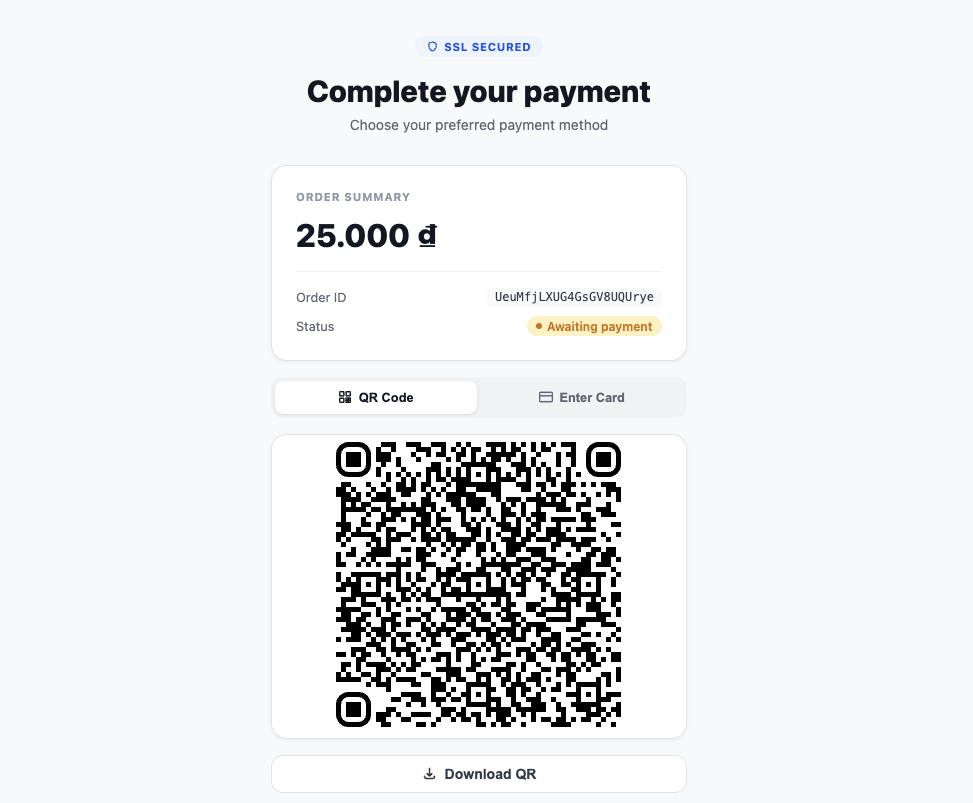
Hiển thị một mã QR Napas bên trong một iframe an toàn. SDK tự động poll trạng thái thanh toán và phát ra các callback cho thành công, thất bại, và lỗi.
bahn.mountPaymentQR(selector, clientSecret, options?)
Gắn một iframe mã QR và bắt đầu luồng thanh toán.
typescript
const qr = bahn.mountPaymentQR("#qr-container", "pi_secret_abc123", {
  height: "350px",
  pollIntervalMs: 3000,
  qrStyle: {
    dotsOptions: { color: "#2563eb", type: "rounded" },
    cornersSquareOptions: { color: "#1e40af", type: "extra-rounded" },
  },
});

qr.on("ready", () => console.log("QR code rendered"));
qr.on("payment:success", (data) => console.log("Payment succeeded", data));
qr.on("payment:failed", (data) => console.log("Payment failed", data));
qr.on("payment:error", (err) => console.error("Payment error", err));
Tham số:
| Tham số | Kiểu | Bắt buộc | Mặc định | Mô tả |
|---|---|---|---|---|
selector | string | Có | — | CSS selector cho container để mount |
clientSecret | string | Có | — | Client secret của payment intent từ backend của bạn |
options.height | string | Không | "300px" | Chiều cao iframe |
options.pollIntervalMs | number | Không | 3000 | Khoảng thời gian polling tính bằng mili giây (tối thiểu: 1000, < 0 sẽ tắt polling) |
options.qrStyle | QRStyle | Không | — | Các tùy chọn style hiển thị cho mã QR |
Giá trị trả về: IQRComponent
IQRComponent
typescript
type QREvent = "ready" | "payment:success" | "payment:failed" | "payment:error";

interface IQRComponent {
  unmount(): void;
  on(event: QREvent, handler: (data?: unknown) => void): void;
  off(event: QREvent, handler: (data?: unknown) => void): void;
  download(name?: string): void;
}
Sự kiện
| Sự kiện | Khi nào | Dữ liệu |
|---|---|---|
ready | Mã QR đã hiển thị và sẵn sàng | không có |
payment:success | Thanh toán được xác nhận thành công | Đối tượng payment intent |
payment:failed | Thanh toán thất bại hoặc bị hủy | Đối tượng payment intent |
payment:error | Lỗi mạng hoặc lỗi không mong đợi | { code, message } |
Handler của payment:error nhận một đối tượng lỗi với code có thể đọc bằng máy:
code | Ý nghĩa |
|---|---|
payment_failed | Thanh toán đạt trạng thái thất bại/hủy cuối cùng (cũng kích hoạt payment:failed) |
invalid_state | Việc polling trạng thái trả về một trạng thái payment-intent không mong đợi |
qr_creation_failed | Không thể tạo mã QR |
network_error | Một request mạng thất bại |
qr.download(name?)
Tải mã QR dưới dạng ảnh PNG. Tên file mặc định là "qr-code".
typescript
qr.download("napas-qr");qr.unmount()
Xóa iframe QR và dọn dẹp các event listener. Được gọi trên IQRComponent trả về từ mountPaymentQR().
typescript
const qr = bahn.mountPaymentQR("#qr-container", clientSecret);
// sau đó
qr.unmount();
QRStyle
typescript
interface QRStyle {
  dotsOptions?: {
    color?: string;
    type?: "square" | "dots" | "rounded" | "extra-rounded" | "classy" | "classy-rounded";
  };
  backgroundOptions?: {
    color?: string;
  };
  cornersSquareOptions?: {
    color?: string;
    type?: "dot" | "square" | "extra-rounded";
  };
}
Hành vi polling
Theo mặc định, SDK poll trạng thái payment intent mỗi 3 giây. Việc polling:
- Kích hoạt
payment:successkhi trạng thái làsucceeded - Kích hoạt
payment:failedkhi trạng thái làcanceled,failed, hoặcrequires_payment_method - Tiếp tục polling cho mọi trạng thái khác
- Tuân theo
pollIntervalMs(tối thiểu 1000ms) - Đặt
pollIntervalMs < 0để tắt hoàn toàn việc polling tự động
Ví dụ đầy đủ
typescript
const bahn = new Bahn({ pk: "pk_live_...", environment: "production" });

// Giả định backend của bạn tạo một PaymentIntent và trả về client_secret
const clientSecret = await fetch("/api/create-qr-payment", {
  method: "POST",
  body: JSON.stringify({ amount: 200000, currency: "vnd" }),
}).then(r => r.json()).then(d => d.client_secret);

const qr = bahn.mountPaymentQR("#qr-code", clientSecret, {
  height: "320px",
  pollIntervalMs: 2000,
  qrStyle: {
    dotsOptions: { color: "#2563eb", type: "rounded" },
    cornersSquareOptions: { color: "#1e40af", type: "extra-rounded" },
  },
});

qr.on("ready", () => {
  document.getElementById("download-btn")!.addEventListener("click", () => {
    qr.download("my-napas-qr");
  });
});

qr.on("payment:success", (data) => {
  window.location.href = "/payment/success";
});

qr.on("payment:failed", (data) => {
  window.location.href = "/payment/failed";
});