
3DS Authentication
The Bahn SDK uses a self-hosted 3D Secure v2 challenge flow — no external CDN dependencies.
This page covers handling a challenge in the browser once it is triggered. To control whether 3DS runs at all — the server-side request_three_d_secure option — see Controlling 3DS.
Sandbox 3DS Behaviour
In the sandbox environment, the 3DS flow depends on the payment amount (VND):
| Amount | 3DS Outcome |
|---|---|
| < 2.000.000 VND | Frictionless — 3DS passes automatically, no challenge shown |
| 2.000.000 – 5.000.000 VND | Challenge — the full 3DS challenge flow is triggered |
| > 5.000.000 VND | Rejected — the payment is declined |
Use these thresholds to test all three 3DS outcomes in sandbox before going live.
bahn.mount3DS(sessionId, callbacks, options?)
Mounts the 3DS challenge modal.
bahn.mount3DS(
  threeDsPayload.id,
  {
    onReady: () => console.log("3DS challenge loaded"),
    onSuccess: () => console.log("3DS authentication passed"),
    onFailure: (error) => console.error("3DS failed:", error.code, error.message),
  },
  { container: "#tds-wrapper" }
);
Parameters:
| Param | Type | Required | Default | Description |
|---|---|---|---|---|
sessionId | string | Yes | — | 3DS session ID from the decoded payload |
callbacks.onReady | () => void | No | — | Fires when the 3DS UI is mounted and ready |
callbacks.onSuccess | () => void | Yes | — | 3DS challenge passed successfully |
callbacks.onFailure | (error?) => void | Yes | — | 3DS challenge failed |
options | ThreeDSecureOptions | No | — | Challenge options (container selector, etc.) |
ThreeDSCallbacks
interface ThreeDSCallbacks {
  onReady?: () => void;
  onSuccess: () => void;
  onFailure: (error?: ComponentError | Record<string, unknown>) => void;
}
The error object passed to onFailure includes:
| Field | Type | Description |
|---|---|---|
code | string | Machine-readable error code |
message | string | Human-readable error description |
3DS Error Codes
The error.code passed to onFailure is one of the kebab-case strings below (e.g. "challenge-failed").
error.code value | Default message |
|---|---|
boot-failed | The 3DS interface failed to initialise. Please try again. |
frame-load-error | The 3DS interface failed to load. Please check your connection and try again. |
session-complete | This 3DS session has already been completed. No further action is needed. |
session-not-found | The 3DS session could not be found. Please ensure you are using a valid session ID. |
session-unknown-error | An unexpected error occurred while communicating with the 3DS service. |
challenge-failed | The card issuer was unable to verify this transaction. Please try a different payment method. |
challenge-cancelled | The verification was cancelled. |
challenge-aborted | Additional verification is required but was skipped by your payment configuration. |
something-went-wrong | Something went wrong. Please try again. |
Switch on the code:
bahn.mount3DS(sessionId, {
  onSuccess: () => {},
  onFailure: (error) => {
    switch (error?.code) {
      case "challenge-cancelled":
        showMessage("You cancelled verification. Please try again.");
        break;
      case "challenge-failed":
        showMessage("Your bank could not verify this card. Try another card.");
        break;
      default:
        showMessage(error?.message ?? "3DS authentication failed.");
    }
  },
});
Unmounting
The modal auto-unmounts when the challenge reaches a terminal state (success or failure). To dismiss it early, call unmount() on the component returned by mount3DS():
const tds = bahn.mount3DS(sessionId, callbacks);
// later, e.g. user cancels
tds.unmount();
The Challenge Modal
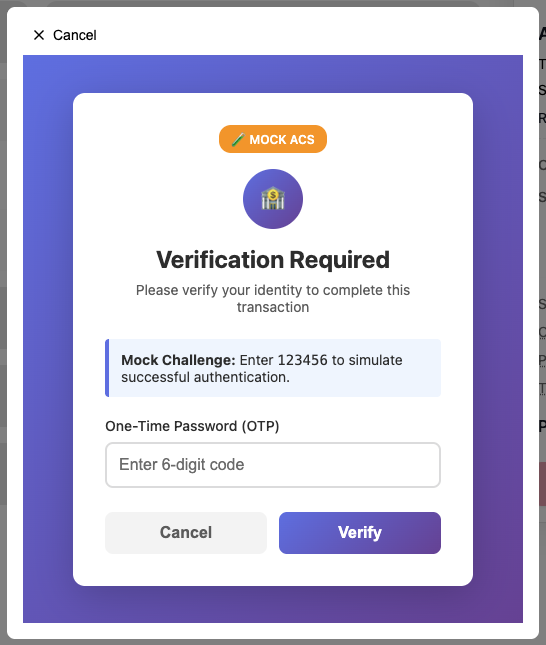
The modal is rendered by the self-hosted 3DS iframe and mounts into options.container (or the document body if omitted). No external scripts are loaded.
3DS Flow Diagram
sequenceDiagram
    participant App as Your App
    participant SDK as Bahn SDK
    participant Iframe as 3DS Iframe
    participant ACS as Issuer ACS

    App->>SDK: confirmPayment(payload)
    SDK-->>App: { payment_intent, three_ds_payload }

    Note over App: three_ds_payload present → 3DS required

    App->>SDK: mount3DS(sessionId, callbacks)
    SDK->>Iframe: Load 3DS challenge
    Iframe->>ACS: Challenge request
    ACS-->>Iframe: Challenge HTML
    Iframe->>ACS: User completes challenge
    ACS-->>Iframe: Challenge result

    alt Challenge passed
        Iframe-->>SDK: success
        SDK-->>App: callbacks.onSuccess()
        App->>SDK: pollPaymentIntentStatus(clientSecret)
    else Challenge failed
        Iframe-->>SDK: failure
        SDK-->>App: callbacks.onFailure({ code, message })
    end
Typical Usage with confirmPayment
Full example
A complete checkout page with 3DS: Integration Examples → Confirm Payment.
// client_secret comes from your backend (create a payment intent server-side)
const { payment_intent, three_ds_payload } = await bahn.confirmPayment({ client_secret });

if (three_ds_payload) {
  bahn.mount3DS(three_ds_payload.id, {
    onSuccess: () => {
      // 3DS passed — poll for the final payment status
      bahn.pollPaymentIntentStatus(client_secret, {
        onProgress: (attempt, max, status) =>
          console.log(`Polling: ${attempt}/${max} — ${status}`),
        onSuccess: (pi) => redirectToSuccess(pi),
        onFailure: (pi) => redirectToFailure(pi),
        onTimeout: () => showTimeoutError(),
        onError: (err) => console.error("Poll error:", err),
      });
    },
    onFailure: (err) => {
      showError(`3DS failed: ${err?.message || "Unknown error"}`);
    },
  });
} else {
  // No 3DS needed — payment intent is ready
  console.log("Payment confirmed:", payment_intent);
}
Standalone Challenge Page (Full-Page Redirect)
The SDK supports two 3DS flows:
| Flow | Method | Best for |
|---|---|---|
| Inline iframe | mount3DS() | Web apps where the SDK can mount an overlay on the same page |
| Full-page redirect | getChallengeRedirectUrl() | Mobile SDKs, external checkout pages, or when a full-page redirect is required |
How it works
- Call
getChallengeRedirectUrl(sessionId, returnUrl, options?)to build the challenge page URL - Redirect the user's browser to that URL
- The challenge page runs the complete 3DS flow (browser fingerprint → challenge → outcome)
- On completion, the challenge page redirects back to
returnUrlwith status and session params
URL Contract
Input: {challengePageUrl}?session=X&redirect=X[&app=X][&team=X][&api=X][&brand=X]
| Param | Required | Description |
|---|---|---|
session | Yes | 3DS session ID |
redirect | Yes | Merchant return URL |
app | No | Tenant app ID for X-Cake-App-Id header |
team | No | Tenant team ID for X-Cake-Team-Id header |
api | No | Backend API base URL (defaults to same-origin) |
brand | No | Brand name shown while returning; default "Cake" |
Output: {returnUrl}?status=success|failure|error&session=X[&code=X]
| Param | Description |
|---|---|
status | success, failure, or error |
session | 3DS session ID |
code | Error code (on failure/error) |
Usage
Full example
The checkout and return pages for this flow: Integration Examples → 3DS on a Separate Page.
const { three_ds_payload } = await bahn.confirmPayment({ client_secret });

if (three_ds_payload) {
  // Build the full-page redirect URL and navigate
  const url = bahn.getChallengeRedirectUrl(
    three_ds_payload.id,
    "https://merchant.com/callback",
    { brandName: "MyStore" },
  );
  window.location.href = url;
}
On your callback page (https://merchant.com/callback), read the status from the URL:
const params = new URLSearchParams(window.location.search);
const status = params.get("status"); // "success" | "failure" | "error"
const sessionId = params.get("session");
const code = params.get("code");
Flow Diagram
sequenceDiagram
    participant App as Your App
    participant SDK as Bahn SDK
    participant CP as Challenge Page
    participant ACS as Issuer ACS

    App->>SDK: confirmPayment(payload)
    SDK-->>App: { payment_intent, three_ds_payload }

    Note over App: three_ds_payload present → 3DS required

    App->>SDK: getChallengeRedirectUrl(sessionId, returnUrl, options?)
    SDK-->>App: https://bn.cake.vn/.../challenge.html?session=...&redirect=...

    App->>CP: window.location.href = url
    CP->>ACS: Browser fingerprint → challenge → complete
    ACS-->>CP: Challenge result
    CP-->>App: Redirect to returnUrl?status=success&session=...

    Note over App: Read status from URL, proceed accordingly