
3DS Authentication — Android
The Cake 3DS SDK for Android (vn.cake.threedsdk) implements the EMV 3-D Secure 2.x protocol for cardholder authentication. The SDK collects and encrypts device data. It exchanges CReq and CRes challenge messages. It renders the challenge UI. It handles protocol errors. The EMVCo specification requires the SDK to communicate directly with the Directory Server (DS) and the Access Control Server (ACS).
SDK Details
| Maven coordinates | vn.cake.threedsdk:cake-3ds-android:{version} |
| Namespace | vn.cake.threedsdk |
| Protocol | EMV 3DS 2.1.0, 2.2.0, 2.3.0, and 2.3.1 |
| Min SDK | 21 |
| Target SDK | 35 |
| Language | Kotlin (Java 11), Kotlin Coroutines for asynchronous calls |
Installation
The SDK supports two installation methods: a local Maven repository, or a direct AAR file.
Option 1: Local Maven Repository (Recommended)
Step 1. Add the Maven repository from Cake to the root build.gradle file of your app.
allprojects {
    repositories {
        maven { url '/path/to/cake-3ds-maven-repo' }
    }
}
Step 2. Add the dependency to the build.gradle file of your app module.
dependencies {
    implementation 'vn.cake.threedsdk:cake-3ds-android:{version}'
}
Option 2: Direct AAR File
Step 1. Copy the AAR file from Cake to the libs/ directory of your app.
Step 2. Add the AAR file and its transitive dependencies to the build.gradle file of your app module.
dependencies {
    implementation files('libs/3ds2sdk-release.aar')

    // Transitive dependencies — add these too
    implementation 'com.nimbusds:nimbus-jose-jwt:10.4.2'
    implementation 'androidx.appcompat:appcompat:1.7.0'
    implementation 'com.google.android.material:material:1.12.0'
    implementation 'androidx.lifecycle:lifecycle-livedata-ktx:2.8.7'
    implementation 'androidx.core:core-ktx:1.13.1'
    implementation 'androidx.activity:activity-ktx:1.9.3'
    implementation 'androidx.fragment:fragment-ktx:1.8.6'
    implementation 'org.jetbrains.kotlinx:kotlinx-coroutines-core:1.10.1'
    implementation 'org.jetbrains.kotlinx:kotlinx-coroutines-android:1.10.1'
}
Initializing the SDK
Create one CakeThreeDs2ServiceImpl instance for each app session. Create it in Application.onCreate(), or in a dependency injection module. The SDK offers two public constructors.
The default constructor uses a built-in SDK reference number:
import vn.cake.threedsdk.service.CakeThreeDs2ServiceImpl
import kotlinx.coroutines.Dispatchers

val service = CakeThreeDs2ServiceImpl(
    context = applicationContext,
    enableLogging = BuildConfig.DEBUG,
    workContext = Dispatchers.IO
)
Use the second constructor when Cake gives you a specific sdkReferenceNumber:
val service = CakeThreeDs2ServiceImpl(
    context = applicationContext,
    sdkReferenceNumber = sdkReferenceNumber,
    enableLogging = BuildConfig.DEBUG,
    workContext = Dispatchers.IO
)| Param | Type | Required | Description |
|---|---|---|---|
context | Context | Yes | Application context |
sdkReferenceNumber | String | No | SDK reference identifier. Omit it to use the built-in default of the SDK. |
enableLogging | Boolean | No (default false) | Enables Logcat output for debugging |
workContext | CoroutineContext | Yes | Dispatcher used for background SDK work (device data collection, encryption) |
| Member | Type | Description |
|---|---|---|
sdkVersion | String | Current SDK version |
warnings | List<Warning> | Warnings detected during initialization, for example a rooted device or an attached debugger |
When the app session ends, call service.cleanup() once to free SDK resources.
Creating a Transaction
For each payment that requires 3DS authentication, create a Transaction:
val transaction = service.createTransaction(
    sdkTransactionId = SdkTransactionId.create(),
    directoryServerID = directoryServerId,       // e.g. "A000000003" for Visa
    messageVersion = null,                       // null = SDK picks the highest supported version
    isLiveMode = !BuildConfig.DEBUG,
    directoryServerName = "visa",
    rootCerts = directoryServerRootCerts,
    dsPublicKey = directoryServerPublicKey,
    keyId = null,
    uiCustomization = CakeUiCustomization.createWithAppTheme(activity)
)| Param | Type | Description |
|---|---|---|
sdkTransactionId | SdkTransactionId | Unique ID for this transaction. Call SdkTransactionId.create() to generate a UUID. |
directoryServerID | String | Directory Server ID of the card network (see the table below) |
messageVersion | String? | Protocol version to use. Pass null to use the latest version that the SDK supports. |
isLiveMode | Boolean | false uses test Directory Server certificates. true uses production certificates. |
directoryServerName | String | Readable name of the DS. The SDK uses it to find the DS logo shown on the processing screen. |
rootCerts | List<X509Certificate> | Root certificates of the DS-CA, used to check the ACS-signed content |
dsPublicKey | PublicKey | Public key of the DS, used to encrypt device data. Get it with service.getPublicKey(directoryServerID). |
keyId | String? | Optional key identifier when the DS publishes multiple keys |
uiCustomization | CakeUiCustomization | Visual customization for the challenge screen (see Customizing the Challenge UI) |
Directory Servers
service.getPublicKey(directoryServerID) resolves the following networks:
| Network | ID | Algorithm |
|---|---|---|
| Visa | A000000003 | RSA |
| Mastercard | A000000004 | RSA |
| Test (RSA) | F055545342 | RSA |
| Test (EC) | F155545342 | EC |
For a network outside this list, supply your own dsPublicKey and rootCerts to createTransaction(...) instead of service.getPublicKey(...).
Getting Authentication Request Parameters
Before you send the Authentication Request (AReq) to your 3DS Server, call createAuthenticationRequestParameters() for each transaction:
lifecycleScope.launch {
    val params = transaction.createAuthenticationRequestParameters()
    // Send `params` to your backend to build and send the AReq
}
This is a suspend function. Call it from a coroutine. It collects and encrypts device data. It also generates the ephemeral key pair for the ACS secure channel.
| Field | Description |
|---|---|
deviceData | Device information, JWE-encrypted with the DS public key |
sdkTransactionId | The SdkTransactionId that you passed to createTransaction() |
sdkAppId | UUID that identifies this app installation, generated by the SDK |
sdkReferenceNumber | SDK reference identifier |
sdkEphemeralPublicKey | Ephemeral EC P-256 public key of the SDK, given as a JWK string |
messageVersion | Protocol version selected for this transaction |
Your backend includes these fields in the AReq. The response from the 3DS Server, the ARes, tells you the outcome. A frictionless outcome needs no further action from the SDK. Otherwise, the ARes requires the challenge flow.
Launching the Challenge
Register ChallengeContract before the activity or fragment reaches the STARTED state, for example as a field set in onCreate. Android requires this early registration for every ActivityResultContract.
import vn.cake.threedsdk.transaction.ChallengeContract
import vn.cake.threedsdk.transaction.ChallengeResult

val challengeLauncher = registerForActivityResult(ChallengeContract()) { result: ChallengeResult ->
    handleChallengeResult(result)
}

fun handleChallengeResult(result: ChallengeResult) {
    when (result) {
        is ChallengeResult.Succeeded -> onAuthenticationSucceeded(result)
        is ChallengeResult.Failed -> onAuthenticationFailed(result)
        is ChallengeResult.Canceled -> onAuthenticationCanceled(result)
        is ChallengeResult.Timeout -> onAuthenticationTimedOut(result)
        is ChallengeResult.ProtocolError -> onProtocolError(result.data)
        is ChallengeResult.RuntimeError -> onRuntimeError(result.throwable)
    }
}
When the ARes requires a challenge, build ChallengeParameters from its contents. Then send the parameters to an InitChallengeRepository. The repository runs the initial CReq and CRes exchange before the SDK shows any UI. On success, pass the result to the challengeLauncher that you registered above:
import vn.cake.threedsdk.transaction.ChallengeParameters
import vn.cake.threedsdk.transaction.IntentData
import vn.cake.threedsdk.transaction.InitChallengeRepositoryFactory
import vn.cake.threedsdk.transaction.InitChallengeResult

val challengeParameters = ChallengeParameters(
    threeDsServerTransactionId = ares.threeDsServerTransId,
    acsTransactionId = ares.acsTransId,
    acsRefNumber = ares.acsReferenceNumber,
    acsSignedContent = ares.acsSignedContent,
    dsTransactionId = ares.dsTransId
)

val initArgs = transaction.createInitChallengeArgs(
    challengeParameters = challengeParameters,
    timeoutMins = 5,
    intentData = IntentData(
        clientSecret = clientSecret,
        sourceId = sourceId,
        publishableKey = publishableKey
    )
)

val repository = InitChallengeRepositoryFactory(
    application = application,
    isLiveMode = !BuildConfig.DEBUG,
    sdkTransactionId = transaction.sdkTransactionId,
    uiCustomization = uiCustomization,
    rootCerts = directoryServerRootCerts,
    enableLogging = BuildConfig.DEBUG,
    workContext = Dispatchers.IO
).create()

lifecycleScope.launch {
    when (val result = repository.startChallenge(initArgs)) {
        is InitChallengeResult.Start ->
            // Initial CReq and CRes succeeded, launch the challenge UI
            challengeLauncher.launch(result.challengeViewArgs)
        is InitChallengeResult.End ->
            // No UI needed, for example the initial request already failed or timed out
            handleChallengeResult(result.challengeResult)
    }
}| Param | Type | Description |
|---|---|---|
challengeParameters | ChallengeParameters | ACS details from the ARes. The 3DS Server transaction ID, the ACS transaction ID, the ACS reference number, and the ACS-signed content are all mandatory. |
timeoutMins | Int | Overall challenge timeout, minimum 5 minutes |
intentData | IntentData | Opaque data (client secret, source ID, publishable key) that the SDK returns to you unchanged in the ChallengeResult |
repository.startChallenge(initArgs) validates the ACS-signed content against the DS-CA root certificates. It completes the Diffie-Hellman key exchange (ECDH P-256). The SDK uses this exchange to encrypt and decrypt the CReq and CRes messages that follow. repository.startChallenge(initArgs) also sends the first CReq. The result is a sealed InitChallengeResult:
| Variant | Fields | Meaning |
|---|---|---|
Start | challengeViewArgs: ChallengeViewArgs | The first ACS round trip succeeded. Pass this value to challengeLauncher.launch(...) to show the challenge UI. |
End | challengeResult: ChallengeResult | The transaction ended before the SDK showed any UI, for example with ProtocolError, Timeout, or RuntimeError on the initial request. Handle it the same way as a ChallengeContract result. |
Processing Screen
Call transaction.getProgressView(activity) to get a non-cancelable dialog with the DS logo and a progress indicator. Show this dialog after you send the AReq. Hide it when the challenge UI appears. The EMVCo specification requires this Processing Screen.
ChallengeResult
The ActivityResultContract callback delivers this sealed class:
| Variant | Fields | Meaning |
|---|---|---|
Succeeded | uiTypeCode, transStatus | Cardholder completed the challenge successfully |
Failed | uiTypeCode | Cardholder failed the challenge |
Canceled | uiTypeCode? | Cardholder canceled, or abandoned the challenge |
Timeout | uiTypeCode? | Challenge exceeded timeoutMins |
ProtocolError | data: ErrorData | CRes failed protocol validation (see Error Handling) |
RuntimeError | throwable: Throwable | Unexpected exception, for example a network or parsing error |
Every variant carries intentData, the IntentData value that you passed in. Every variant also carries initialUiType, the UiType of the first challenge screen shown. Use these fields to match the result to your payment flow. You do not need to keep separate state.
The Challenge Screen
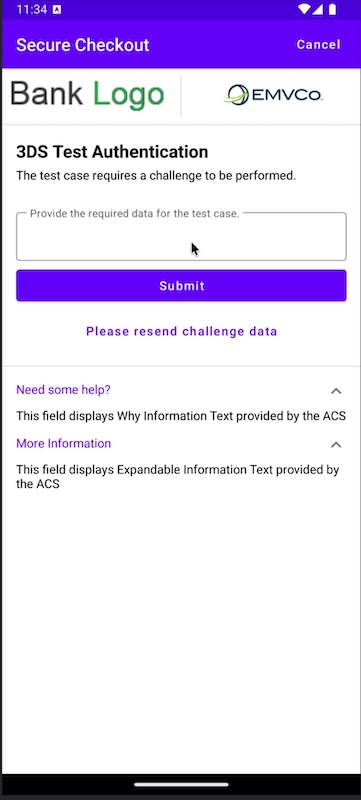
ChallengeActivity renders this screen. The CakeUiCustomization that you pass to createTransaction(...) controls its colors, fonts, and button styles. See Customizing the Challenge UI for the full set of options.
Frictionless vs. Challenge Flow
stateDiagram-v2
    [*] --> Created: createTransaction()
    Created --> AuthParams: createAuthenticationRequestParameters()
    AuthParams --> Frictionless: ARes, no challenge required
    AuthParams --> Challenge: ARes, challenge required
    Challenge --> Completed: ChallengeResult Succeeded or Failed
    Challenge --> Error: ChallengeResult ProtocolError or RuntimeError
    Challenge --> TimedOut: ChallengeResult Timeout
    Frictionless --> [*]
    Completed --> [*]
    Error --> [*]
    TimedOut --> [*]
Challenge UI Types
The ACS decides which UI the challenge screen shows. The SDK exposes this value as initialUiType, and also inside ErrorData:
UiType | Code | Requires Submit Button | Description |
|---|---|---|---|
Text | 01 | Yes | Free-text entry, for example an OTP |
SingleSelect | 02 | Yes | Single choice from a list |
MultiSelect | 03 | Yes | Multiple choices from a list |
OutOfBand | 04 | No | Resolved outside the app, for example in the banking app of the cardholder |
Html | 05 | No | ACS-provided HTML rendered in a WebView |
HtmlOob | 06 | No | HTML challenge combined with an out-of-band continue action |
Information | 07 | No | Informational screen with a continue button, no data entry |
Error Handling
ChallengeResult.ProtocolError carries an ErrorData object. This object describes why the CRes failed validation:
| Field | Description |
|---|---|
errorCode | Protocol error code (see table below) |
errorComponent | Which component reported the error: ThreeDsSdk, ThreeDsServer, DirectoryServer, or Acs |
errorDescription | Human-readable description |
errorDetail | Specific field name that failed validation, where applicable |
Protocol Error Codes
| Code | Name | Trigger |
|---|---|---|
101 | InvalidMessageReceived | The messageType field in the CRes was not "CRes" |
102 | UnsupportedMessageVersion | The version is missing, empty, or does not match the CReq |
201 | RequiredDataElementMissing | A required field is absent for the current UiType |
202 | UnrecognizedCriticalMessageExtensions | An unsupported critical message extension was present |
203 | InvalidDataElementFormat | The format, length, or value of a field is invalid |
207 | ReservedValueRange | A value fell in a reserved range |
301 | InvalidTransactionId | The transaction IDs in the CRes do not match the CReq |
302 | DataDecryptionFailure | JWE decryption of the CRes failed |
402 | TransactionTimedout | The transaction exceeded the configured timeout |
The SDK notifies the ACS of the error automatically. This is a fire-and-forget action. The SDK returns ChallengeResult.ProtocolError to your app after this. You do not need to take any other action.
Customizing the Challenge UI
You can create a CakeUiCustomization in two ways.
Option 1: From Your App Theme
CakeUiCustomization.createWithAppTheme(activity) reads the primary color, the accent color, and the text colors from the theme of your app. It applies these colors to the toolbar, the labels, and the default buttons.
val uiCustomization = CakeUiCustomization.createWithAppTheme(activity)Use this option when the challenge screen must match the rest of your app automatically. You can still override individual parts afterward, as the example below shows.
Option 2: Manual Customization
The plain CakeUiCustomization() constructor starts with no defaults. You set every color and style yourself.
val uiCustomization = CakeUiCustomization()Use this option for full control over the challenge screen.
Customizing Individual Parts
CakeUiCustomization holds four customization objects: one for the toolbar, one for labels, one for text boxes, and one set of buttons, one per ButtonType. Each object controls a different part of the challenge screen. The example below starts from createWithAppTheme(activity) (Option 1) and overrides specific parts:
import vn.cake.threedsdk.init.ui.CakeUiCustomization
import vn.cake.threedsdk.init.ui.CakeToolbarCustomization
import vn.cake.threedsdk.init.ui.CakeLabelCustomization
import vn.cake.threedsdk.init.ui.CakeTextBoxCustomization
import vn.cake.threedsdk.init.ui.CakeButtonCustomization
import vn.cake.threedsdk.init.ui.UiCustomization.ButtonType

val uiCustomization = CakeUiCustomization.createWithAppTheme(activity).apply {
    setAccentColor("#FF6B00")

    val toolbar = CakeToolbarCustomization().apply {
        setBackgroundColor("#1A1A1A")
        setStatusBarColor("#000000")
        setHeaderText("Secure Checkout")
        setButtonText("CANCEL")
        setTextColor("#FFFFFF")
    }
    setToolbarCustomization(toolbar)

    val labels = CakeLabelCustomization().apply {
        setHeadingTextColor("#000000")
        setHeadingTextFontSize(20)
        setTextColor("#333333")
        setTextFontSize(16)
    }
    setLabelCustomization(labels)

    val textBox = CakeTextBoxCustomization().apply {
        setBorderColor("#89000000")
        setBorderWidth(2)
        setCornerRadius(8)
        setHintTextColor("#89000000")
    }
    setTextBoxCustomization(textBox)

    val submitButton = CakeButtonCustomization().apply {
        setBackgroundColor("#FF6B00")
        setTextColor("#FFFFFF")
        setCornerRadius(8)
    }
    setButtonCustomization(submitButton, ButtonType.SUBMIT)
    setButtonCustomization(submitButton, ButtonType.NEXT)
    setButtonCustomization(submitButton, ButtonType.CONTINUE)

    val cancelButton = CakeButtonCustomization().apply {
        setBackgroundColor("#EC4847")
        setTextColor("#FFFFFF")
    }
    setButtonCustomization(cancelButton, ButtonType.CANCEL)
}
Import Note
ButtonType is nested inside the UiCustomization interface. Import it with import vn.cake.threedsdk.init.ui.UiCustomization.ButtonType.
CakeToolbarCustomization
| Method | Sets |
|---|---|
setBackgroundColor(hex) | Background color of the toolbar |
setStatusBarColor(hex) | Color of the status bar above the toolbar |
setHeaderText(text) | Title text shown in the toolbar |
setButtonText(text) | Text of the cancel button in the toolbar |
setTextColor(hex) | Color of the header text and the button text |
CakeLabelCustomization
| Method | Sets |
|---|---|
setHeadingTextColor(hex) | Color of heading text |
setHeadingTextFontName(name) | Font of heading text |
setHeadingTextFontSize(size) | Font size of heading text |
setTextColor(hex) | Color of body label text |
setTextFontName(name) | Font of body label text |
setTextFontSize(size) | Font size of body label text |
CakeTextBoxCustomization
| Method | Sets |
|---|---|
setBorderColor(hex) | Border color of the input field |
setBorderWidth(dp) | Border width of the input field |
setCornerRadius(dp) | Corner radius of the input field |
setHintTextColor(hex) | Color of the hint text |
setTextColor(hex) | Color of the text that the cardholder enters |
setTextFontName(name) | Font of the text that the cardholder enters |
setTextFontSize(size) | Font size of the text that the cardholder enters |
CakeButtonCustomization
| Method | Sets |
|---|---|
setBackgroundColor(hex) | Background color of the button |
setCornerRadius(dp) | Corner radius of the button |
setTextColor(hex) | Color of the button text |
setTextFontName(name) | Font of the button text |
setTextFontSize(size) | Font size of the button text |
Set one CakeButtonCustomization for each button that you want to customize. ButtonType defines seven values: SUBMIT, CONTINUE, NEXT, CANCEL, RESEND, SELECT, and ADD_CHOICE. For a button type outside this list, call setButtonCustomization(customization, "your_button_type") with a string instead.
Pass the resulting uiCustomization into service.createTransaction(...).
Full Flow Diagram
sequenceDiagram
    participant App as Merchant App
    participant SDK as 3DS SDK
    participant ACS as Issuer ACS

    App->>SDK: CakeThreeDs2ServiceImpl(context, enableLogging, workContext)
    SDK-->>App: CakeThreeDs2Service

    App->>SDK: createTransaction(directoryServerID, dsPublicKey, ...)
    SDK-->>App: Transaction

    App->>SDK: createAuthenticationRequestParameters()
    SDK-->>App: AuthenticationRequestParameters

    Note over App: Send AReq to your 3DS Server, receive ARes

    alt Frictionless
        Note over App: ARes indicates no challenge is needed
    else Challenge required
        App->>SDK: createInitChallengeArgs(challengeParameters, timeoutMins, intentData)
        SDK-->>App: InitChallengeArgs
        App->>SDK: startChallenge(initArgs)
        SDK->>ACS: Validate ACS-signed content, key exchange, initial CReq
        ACS-->>SDK: Initial CRes
        SDK-->>App: InitChallengeResult

        alt Start
            App->>SDK: launch(challengeViewArgs)
            SDK->>ACS: Remaining CReq and CRes exchange
            ACS-->>SDK: Challenge result
            SDK-->>App: ChallengeResult
        else End
            Note over App: Transaction ended before any UI, for example ProtocolError, Timeout, or RuntimeError
        end
    end