
3DS Authentication — iOS
The Cake 3DS SDK for iOS (Cake3DS2) implements the EMV 3-D Secure 2.x protocol for cardholder authentication. The SDK core is Objective-C, with public headers that Swift code can call directly. The SDK collects and encrypts device data. It exchanges CReq and CRes challenge messages. It renders the challenge UI. It handles protocol errors. The EMVCo specification requires the SDK to communicate directly with the Directory Server (DS) and the Access Control Server (ACS).
SDK Details
| Package name | Cake3DS2 |
| Distribution | Swift Package Manager, or a direct XCFramework file |
| Namespace | Cake3DS2 module, CKDS-prefixed public classes |
| Protocol | EMV 3DS 2.1.0, 2.2.0, 2.3.0, and 2.3.1 |
| Min iOS | 13.0 |
| Language | Objective-C (SDK core), callable from Swift |
Installation
The SDK supports two installation methods: Swift Package Manager, or a direct XCFramework file.
Option 1: Swift Package Manager (Recommended)
Step 1. Add the Cake3DS2 package to your project. Use the package path or URL that Cake gives you.
// Package.swift
dependencies: [
    .package(path: "/path/to/cake-3ds-swift-package") // or a git URL that Cake gives you
]
Step 2. Add Cake3DS2 as a dependency of your app target.
.target(
    name: "YourApp",
    dependencies: ["Cake3DS2"]
)
If you use Xcode instead of a Package.swift file, add the package through File > Add Package Dependencies.
Option 2: Direct XCFramework File
Step 1. Copy the Cake3DS2.xcframework file from Cake to your project.
Step 2. Add the file to your app target. In the target's General settings, under "Frameworks, Libraries, and Embedded Content", set it to "Embed & Sign".
The XCFramework file also needs three system frameworks. Add these to the same list in your app target:
UIKit.framework
Security.framework
WebKit.framework
Initializing the SDK
Create one CKDSThreeDS2Service instance for each app session. Create it at app launch, or in your dependency injection module. The SDK offers two initialize methods.
The first method uses only the default settings:
import Cake3DS2

let service = CKDSThreeDS2Service()
let config = CKDSConfigParameters(standardParameters: ())

service.initialize(withConfig: config, locale: nil, uiSettings: nil)
Use the second method when you need an analytics delegate:
service.initialize(
    withConfig: config,
    locale: nil,
    uiSettings: uiCustomization,
    analyticsDelegate: myAnalyticsDelegate
)| Param | Type | Required | Description |
|---|---|---|---|
config | CKDSConfigParameters | Yes | Configuration object. Use CKDSConfigParameters(standardParameters: ()) unless Cake gives you extra parameters to add. |
locale | Locale? | No | Locale override for the challenge UI. Pass nil to use the system locale. |
uiSettings | CKDSUICustomization? | No | Visual customization for the challenge screens (see Customizing the Challenge UI). Pass nil for CKDSUICustomization.defaultSettings(). |
analyticsDelegate | CKDSAnalyticsDelegate | Only on the second method | Delegate that receives challenge analytics events, for example an OTP submit tap |
| Member | Type | Description |
|---|---|---|
warnings | [CKDSWarning]? | Warnings found during initialization, for example a jailbroken device or an attached debugger |
Cake3DS2 has no service-level cleanup method. Each CKDSTransaction cleans up its own resources instead (see Creating a Transaction).
Creating a Transaction
For each payment that needs 3DS authentication, create a CKDSTransaction. Cake3DS2 has a built-in certificate for seven networks. Pass only the directoryServerID for these:
let transaction = service.createTransaction(
    forDirectoryServer: directoryServerId,   // e.g. "A000000003" for Visa
    withProtocolVersion: nil                 // nil = SDK picks its default (2.2.0)
)| Param | Type | Description |
|---|---|---|
directoryServerID | String | Directory Server ID of the card network (see the table below) |
protocolVersion | String? | Protocol version to use. Pass nil to use the SDK default. |
For a network outside the built-in list, supply your own certificate instead:
let transaction = service.createTransaction(
    forDirectoryServer: directoryServerId,
    serverKeyID: serverKeyId,                // optional key from the DS
    certificateString: certificateString,    // base64 PEM or DER, the DS public key
    rootCertificateStrings: rootCertStrings, // base64 PEM or DER, the DS-CA root certificates
    withProtocolVersion: nil
)| Param | Type | Description |
|---|---|---|
directoryServerID | String | Directory Server ID returned in the authentication response |
serverKeyID | String? | Additional authentication key that some Directory Servers require |
certificateString | String | Base64-encoded PEM or DER certificate that contains the DS public key |
rootCertificateStrings | [String] | Base64-encoded PEM or DER root certificates of the DS-CA, used to check ACS-signed content |
protocolVersion | String? | Protocol version to use. Pass nil to use the SDK default. |
UI Customization
Pass uiSettings once, to service.initialize(withConfig:locale:uiSettings:). createTransaction does not take a UI customization param. Every transaction from the same service instance shares one customization. See Customizing the Challenge UI.
Directory Servers
Cake3DS2 has a built-in certificate for these networks:
| Network | ID |
|---|---|
| Visa | A000000003 |
| Mastercard | A000000004 |
| American Express | A000000025 |
| Discover | A000000324 |
| Cartes Bancaires | A000000042 |
| Test (RSA) | F055545342 |
| Test (EC) | F155545342 |
For a network outside this list, supply your own certificateString and rootCertificateStrings to createTransaction(forDirectoryServer:serverKeyID:certificateString:rootCertificateStrings:withProtocolVersion:) instead.
Getting Authentication Request Parameters
Before you send the Authentication Request (AReq) to your 3DS Server, call createAuthenticationRequestParameters() for each transaction:
let params = transaction.createAuthenticationRequestParameters()
// Send `params` to your backend to build and send the AReq
This method is synchronous. It returns immediately. Cake3DS2 collects device data once, during initialize(withConfig:locale:uiSettings:). This method only encrypts that data, and packages it, together with SDK details, into a CKDSAuthenticationRequestParameters object.
| Field | Description |
|---|---|
deviceData | Device information, JWE-encrypted. nil if the SDK has no device data to report. |
sdkTransactionIdentifier | The transaction ID that the SDK assigned to this CKDSTransaction |
sdkAppIdentifier | UUID that identifies this app installation, generated by the SDK |
sdkReferenceNumber | SDK reference identifier |
sdkEphemeralPublicKey | Ephemeral EC public key of the SDK, given as a JWK string |
messageVersion | Protocol version selected for this transaction |
Your backend includes these fields in the AReq. The response from the 3DS Server, the ARes, tells you the outcome. A frictionless outcome needs no further action from the SDK. Otherwise, the ARes requires the challenge flow.
Launching the Challenge
Cake3DS2 does not use a request-based launcher. Conform to the CKDSChallengeStatusReceiver protocol instead. Pass an object that conforms to this protocol into doChallenge(with:challengeParameters:challengeStatusReceiver:timeout:).
import Cake3DS2

extension PaymentViewController: CKDSChallengeStatusReceiver {
    func transaction(_ transaction: CKDSTransaction, didCompleteChallengeWith completionEvent: CKDSCompletionEvent) {
        onAuthenticationSucceeded(completionEvent)
    }

    func transactionDidCancel(_ transaction: CKDSTransaction) {
        onAuthenticationCanceled()
    }

    func transactionDidTimeOut(_ transaction: CKDSTransaction) {
        onAuthenticationTimedOut()
    }

    func transaction(_ transaction: CKDSTransaction, didErrorWith protocolErrorEvent: CKDSProtocolErrorEvent) {
        onProtocolError(protocolErrorEvent.errorMessage)
    }

    func transaction(_ transaction: CKDSTransaction, didErrorWith runtimeErrorEvent: CKDSRuntimeErrorEvent) {
        onRuntimeError(runtimeErrorEvent)
    }
}
When the ARes requires a challenge, build CKDSChallengeParameters from its contents. Then call doChallenge(with:challengeParameters:challengeStatusReceiver:timeout:) on the transaction:
import Cake3DS2

let challengeParameters = CKDSChallengeParameters()
challengeParameters.threeDSServerTransactionID = ares.threeDSServerTransID
challengeParameters.acsTransactionID = ares.acsTransID
challengeParameters.acsReferenceNumber = ares.acsReferenceNumber
challengeParameters.acsSignedContent = ares.acsSignedContent

transaction.doChallenge(
    with: presentingViewController,
    challengeParameters: challengeParameters,
    challengeStatusReceiver: self,
    timeout: 5 * 60 // seconds. Minimum 5 minutes (300 seconds).
)| Param | Type | Description |
|---|---|---|
presentingViewController | UIViewController | View controller that the SDK uses to present the challenge screen |
challengeParameters | CKDSChallengeParameters | ACS details from the ARes. threeDSServerTransactionID, acsTransactionID, acsReferenceNumber, and acsSignedContent are all mandatory. |
challengeStatusReceiver | CKDSChallengeStatusReceiver | Object that receives the challenge result (see the table below) |
timeout | TimeInterval | Challenge timeout, in seconds. The minimum is 5 minutes (300 seconds). |
doChallenge(...) validates the ACS-signed content against the DS-CA root certificates. It completes the Diffie-Hellman key exchange (ECDH P-256). The SDK uses this exchange to encrypt and decrypt the CReq and CRes messages that follow. This one call runs the whole challenge flow. It presents the challenge screen, and calls back your challengeStatusReceiver when the flow ends.
Processing Screen
Call transaction.createProgressViewController(didCancel:) to get a view controller with the DS logo and a spinner, and no on-screen cancel control. Present it after you send the AReq. Dismiss it when the challenge screen appears. The EMVCo specification requires this Processing Screen.
CKDSChallengeStatusReceiver
Conform to this protocol to receive the challenge status at the end of the challenge process:
| Method | Called When |
|---|---|
transaction(_:didCompleteChallengeWith:) | The challenge process finished. Check completionEvent.transactionStatus for the outcome that the ACS sent in the final CRes. |
transactionDidCancel(_:) | The cardholder chose to cancel the transaction on the challenge screen |
transactionDidTimeOut(_:) | The challenge process reached the timeout interval that you passed to doChallenge |
transaction(_:didErrorWith:) (with a CKDSProtocolErrorEvent) | The SDK received an EMV 3-D Secure protocol error message from the ACS (see Error Handling) |
transaction(_:didErrorWith:) (with a CKDSRuntimeErrorEvent) | The SDK found an error during the challenge process outside the protocol errors above, for example a network or parsing error |
Two more methods are optional:
| Method | Called When |
|---|---|
transactionDidPresentChallengeScreen(_:) | The transaction shows a new challenge screen |
dismissChallengeViewController(_:forTransaction:) | Reserved for internal use by the Cake SDK |
Every method carries the transaction instance. If your app runs more than one transaction at a time, use this value to match the callback to its transaction.
The Challenge Screen
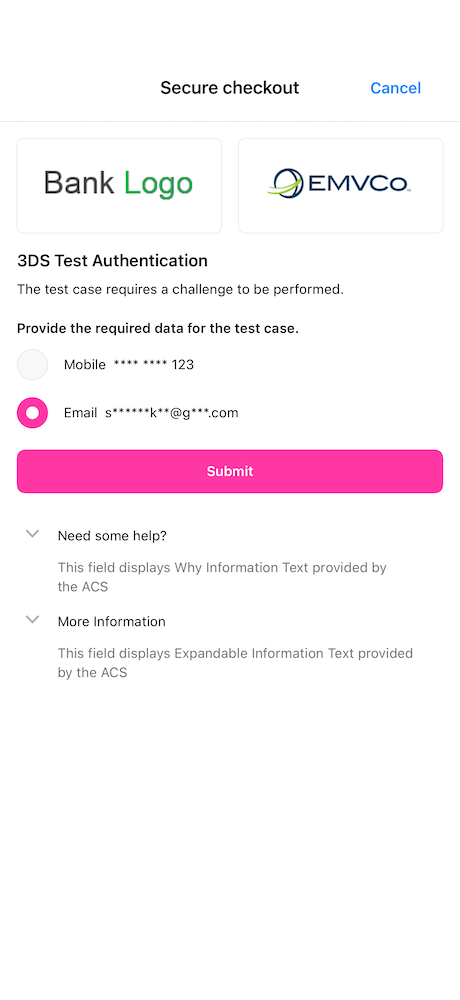
CKDSChallengeResponseViewController renders this screen. The CKDSUICustomization that you pass to initialize(withConfig:locale:uiSettings:) controls its colors, fonts, and button styles. See Customizing the Challenge UI for the full set of options.
Frictionless vs. Challenge Flow
stateDiagram-v2
    [*] --> Created: createTransaction(forDirectoryServer:withProtocolVersion:)
    Created --> AuthParams: createAuthenticationRequestParameters()
    AuthParams --> Frictionless: ARes, no challenge required
    AuthParams --> Challenge: ARes, challenge required
    Challenge --> Completed: didCompleteChallengeWith
    Challenge --> Canceled: transactionDidCancel
    Challenge --> Error: didErrorWith (protocol or runtime event)
    Challenge --> TimedOut: transactionDidTimeOut
    Frictionless --> [*]
    Completed --> [*]
    Canceled --> [*]
    Error --> [*]
    TimedOut --> [*]
Challenge UI Types
The ACS decides which UI the challenge screen shows. Cake3DS2 exposes this value as transaction.presentedChallengeUIType, after the challenge completes:
| Value | Code | Requires Submit Button | Description |
|---|---|---|---|
text | 01 | Yes | Free-text entry, for example an OTP |
single_select | 02 | Yes | Single choice from a list |
multi_select | 03 | Yes | Multiple choices from a list |
oob | 04 | No | Resolved outside the app, for example in the banking app of the cardholder |
html | 05 | No | ACS-provided HTML rendered in a WKWebView |
html_oob | 06 | No | HTML challenge combined with an out-of-band continue action |
information | 07 | No | Informational screen with a continue button, no data entry |
Error Handling
CKDSProtocolErrorEvent.errorMessage is a CKDSErrorMessage object. This object describes why the CRes failed validation:
| Field | Description |
|---|---|
errorCode | Protocol error code (see the table below) |
errorComponent | The 3-D Secure component that found the error |
errorDescription | Human-readable description |
errorDetails | Additional error details, where applicable |
messageVersion | Protocol version identifier |
acsTransactionIdentifier | Transaction identifier that the ACS assigned, if known |
errorMessageType | The message type that the error found |
Protocol Error Codes
| Code | Name | Trigger |
|---|---|---|
101 | InvalidMessage | The SDK received a message that is not an ARes, CRes, or ErrorMessage |
201 | RequiredDataElementMissing | A required field is absent from the network response |
202 | UnrecognizedCriticalMessageExtension | An unsupported critical message extension was present |
203 | InvalidDataElement | The format or the value of a field is invalid |
301 | TransactionIDNotRecognized | The transaction ID in the CRes does not match the CReq |
302 | DataDecryptionFailure | JWE decryption of the CRes failed |
402 | Timeout | The SDK reached its timeout |
CKDSErrorMessageCode does not define named constants for error codes 102 (UnsupportedMessageVersion) or 207 (ReservedValueRange). If the ACS sends one of these codes, the SDK still reports it as a plain string in errorCode.
The SDK notifies the ACS of the error, automatically. This is a fire-and-forget action. Cake3DS2 calls transaction(_:didErrorWith:) (with a CKDSProtocolErrorEvent) on your app after this. You do not need to take any other action.
CKDSRuntimeErrorEvent carries a plain errorCode string and an errorMessage string, for errors outside the protocol table above, for example a network or parsing error. Two known values are kCKDSRuntimeErrorCodeParsingError and kCKDSRuntimeErrorCodeEncryptionError.
Customizing the Challenge UI
You can build a CKDSUICustomization in two ways.
Option 1: CKDSUICustomization.defaultSettings()
CKDSUICustomization.defaultSettings() gives you Cake's design-system theme, already set. Every color, font, and corner radius has a default value.
let uiCustomization = CKDSUICustomization.defaultSettings()Use this option to match Cake's default checkout look. You can still override individual parts afterward, as the example below shows.
Option 2: Manual Customization
Build each customization object yourself, and assign it to a fresh CKDSUICustomization instance:
let uiCustomization = CKDSUICustomization()
uiCustomization.navigationBarCustomization = CKDSNavigationBarCustomization.defaultSettings()
uiCustomization.labelCustomization = CKDSLabelCustomization.defaultSettings()
uiCustomization.textFieldCustomization = CKDSTextFieldCustomization.defaultSettings()
uiCustomization.footerCustomization = CKDSFooterCustomization.defaultSettings()
uiCustomization.selectionCustomization = CKDSSelectionCustomization.defaultSettings()
Use this option when you need full control over the challenge screen.
Customizing Individual Parts
CKDSUICustomization holds five nested objects: one for the navigation bar, one for labels, one for text fields, one for the footer, and one for radio buttons and checkboxes. Buttons use a separate customization, one per CKDSUICustomizationButtonType. The example below starts from defaultSettings() (Option 1) and overrides specific parts:
import Cake3DS2

let uiCustomization = CKDSUICustomization.defaultSettings()
uiCustomization.backgroundColor = .white

let navigationBar = CKDSNavigationBarCustomization.defaultSettings()
navigationBar.barTintColor = UIColor(red: 0.10, green: 0.10, blue: 0.10, alpha: 1)
navigationBar.headerText = "Secure Checkout"
navigationBar.buttonText = "CANCEL"
navigationBar.textColor = .white
uiCustomization.navigationBarCustomization = navigationBar

let labels = CKDSLabelCustomization.defaultSettings()
labels.headingTextColor = .black
labels.textColor = UIColor(white: 0.2, alpha: 1)
uiCustomization.labelCustomization = labels

let textField = CKDSTextFieldCustomization.defaultSettings()
textField.borderColor = UIColor(white: 0, alpha: 0.5)
textField.borderWidth = 2
textField.cornerRadius = 8
uiCustomization.textFieldCustomization = textField

let submitButton = CKDSButtonCustomization.defaultSettings(for: .submit)
submitButton.backgroundColor = UIColor(red: 1.0, green: 0.42, blue: 0.0, alpha: 1)
submitButton.cornerRadius = 8
uiCustomization.setButton(submitButton, for: .submit)
uiCustomization.setButton(submitButton, for: .next)
uiCustomization.setButton(submitButton, for: .continue)

let cancelButton = CKDSButtonCustomization.defaultSettings(for: .cancel)
cancelButton.backgroundColor = UIColor(red: 0.93, green: 0.28, blue: 0.28, alpha: 1)
uiCustomization.setButton(cancelButton, for: .cancel)
Colors and Fonts
Cake3DS2 setters take native UIColor and UIFont values, not hex strings. Build each UIColor from your own hex helper, or from UIColor(red:green:blue:alpha:).
CKDSNavigationBarCustomization
| Property | Sets |
|---|---|
barTintColor | Background color of the navigation bar |
barStyle | Bar style of the navigation bar |
translucent | Whether the navigation bar is translucent |
scrollEdgeAppearance | Appearance of the navigation bar at the scroll edge |
headerText | Title text shown in the navigation bar |
buttonText | Text of the cancel button in the navigation bar |
font / textColor | Font and color of the title text and the button text |
CKDSLabelCustomization
| Property | Sets |
|---|---|
headingTextColor | Color of heading text |
headingFont | Font of heading text |
font / textColor | Font and color of body label text |
CKDSTextFieldCustomization
| Property | Sets |
|---|---|
borderWidth | Border width of the input field |
borderColor | Border color of the input field |
cornerRadius | Corner radius of the input field |
keyboardAppearance | Keyboard appearance for the field |
placeholderTextColor | Color of the hint text |
font / textColor | Font and color of the text that the cardholder enters |
CKDSFooterCustomization
| Property | Sets |
|---|---|
backgroundColor | Background color of the expandable footer |
chevronColor | Color of the expand and collapse chevron |
headingTextColor | Color of the footer heading text |
headingFont | Font of the footer heading text |
CKDSSelectionCustomization
| Property | Sets |
|---|---|
primarySelectedColor | Primary color of the selected state |
secondarySelectedColor | Secondary color of the selected state, for example the checkmark |
unselectedBackgroundColor | Background color in the unselected state |
unselectedBorderColor | Border color in the unselected state |
CKDSButtonCustomization
| Property | Sets |
|---|---|
backgroundColor | Background color of the button |
cornerRadius | Corner radius of the button |
titleStyle | Case transform for the button title: .default, .uppercase, .lowercase, or .sentenceCapitalized |
font / textColor | Font and color of the button text |
Set one CKDSButtonCustomization for each button type that you want to customize. CKDSUICustomizationButtonType defines seven values: .submit, .continue, .next, .cancel, .resend, .openOOBApp, and .addChoice.
Pass the resulting uiCustomization into service.initialize(withConfig:locale:uiSettings:).
Full Flow Diagram
sequenceDiagram
    participant App as Merchant App
    participant SDK as 3DS SDK
    participant ACS as Issuer ACS

    App->>SDK: CKDSThreeDS2Service().initialize(withConfig:locale:uiSettings:)
    SDK-->>App: warnings, if any

    App->>SDK: createTransaction(forDirectoryServer:withProtocolVersion:)
    SDK-->>App: CKDSTransaction

    App->>SDK: createAuthenticationRequestParameters()
    SDK-->>App: CKDSAuthenticationRequestParameters

    Note over App: Send AReq to your 3DS Server, receive ARes

    alt Frictionless
        Note over App: ARes indicates no challenge is needed
    else Challenge required
        App->>SDK: doChallenge(with:challengeParameters:challengeStatusReceiver:timeout:)
        SDK->>ACS: Validate ACS-signed content, key exchange, initial CReq
        ACS-->>SDK: Initial CRes

        Note over SDK: Presents the challenge screen

        SDK->>ACS: Remaining CReq and CRes exchange
        ACS-->>SDK: Challenge result
        SDK-->>App: didComplete, didCancel, didTimeOut, or didError on CKDSChallengeStatusReceiver
    end