
Card Payments
PCI-compliant card input via isolated iframes. Card values never leave the iframes — only boolean validity state is reported to your application.
bahn.mountCard(containerId, options?)
Mounts the card input component inside a container element.
const card = bahn.mountCard("#card-container", {
  fields: {
    number: {
      label: "Card Number",
      placeholder: "1234 5678 9012 3456",
      errorMsg: { incomplete_number: "Please enter a complete card number" },
    },
    expiry: {
      label: "Expiry",
      placeholder: "MM / YY",
    },
    cvc: {
      label: "CVC",
      placeholder: "123",
      errorMsg: "Invalid CVC",
    },
  },
  layout: {
    gap: "12px",
    cardNumberHeight: "85px",
    fieldHeight: "85px",
  },
  inputStyle: {
    fontFamily: "Inter, sans-serif",
    fontSize: "16px",
    color: "#1a1a2e",
    backgroundColor: "#f8f9fa",
    borderRadius: "8px",
  },
});
Parameters:
| Param | Type | Required | Default | Description |
|---|---|---|---|---|
containerId | string | Yes | — | CSS selector for the mount container |
options.fields | object | No | — | Per-field label, placeholder, and error message config |
options.layout | CardLayoutConfig | No | — | Grid layout configuration |
options.inputStyle | CardInputStyle | No | — | Styling applied to all iframe input elements |
options.stateStyles | CardStateStyles | No | — | State-based styling (base/focus/invalid). See State-Based Styling. |
options.cvvPeek | boolean | No | false | Reveal each CVV digit for ~500ms then auto-mask to •. Length follows detected card scheme (3 digits, 4 for Amex) with shake warning on invalid input. |
options.allowedSchemes | Array<CardScheme> | No | — | Restrict card number input to specific schemes (e.g. ["visa", "mastercard"]). Unlisted schemes are treated as invalid. |
Returns: CardComponent

CardComponent
The object returned by mountCard().
interface CardComponent {
  mount(selector: string): void;
  unmount(): void;
  on(event: string, handler: (data?: any) => void): void;
  validate(): void;
  readonly values: {
    isComplete: boolean;
    isValid: boolean;
    errors?: Record<string, string>;
  };
}
Events
| Event | When | Data |
|---|---|---|
ready | All three iframes loaded | none |
change | Any field validity changes | values object |
complete | All fields are valid | values object (isComplete: true) |
card.values
card.on("change", (data) => {
  const values = data as { isComplete: boolean; isValid: boolean; errors?: Record<string, string> };
  if (values.isComplete) {
    console.log("All fields valid — ready to submit");
  }
  if (values.errors) {
    console.log("Validation errors:", values.errors);
    // e.g. { number: "Invalid card number", cvc: "Invalid CVC" }
  }
});
The
changehandler receivesdata?: unknown(card values never cross the iframe boundary), so cast to the validity shape as above.
The values object reports validity only. Card numbers are never exposed to your application.
card.validate()
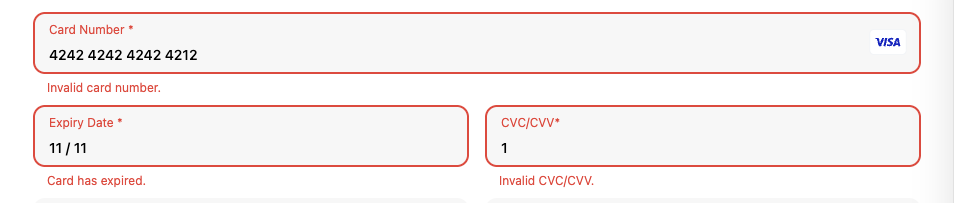
Triggers validation on all iframes and emits a change event with the latest values. Use this to force error display before form submission.
card.unmount()
Removes the card input from the DOM and cleans up event listeners. Called on the CardComponent returned by mountCard(). Safe to call multiple times.
const card = bahn.mountCard("card-container");
// later
card.unmount();
card.applyConfig(fields, inputStyle?)
Re-applies field configuration to already-mounted iframes without remounting. Useful for dynamic changes like language switching. Called on the CardComponent returned by mountCard().
const card = bahn.mountCard("card-container");
card.applyConfig(
  {
    number: { label: "Số thẻ" },     // Vietnamese labels
    expiry: { label: "Hết hạn" },
    cvc: { label: "Mã CVC" },
  },
  { fontSize: "14px" }
);
CardLayoutConfig
Controls the grid layout of the three iframes.
interface CardLayoutConfig {
  columns?: 1 | 2;           // Number of columns (default: 2). 1 = each field on its own row.
  gap?: string;              // Gap between fields (default: "8px")
  columnGap?: string;        // Gap between expiry and CVC columns (overrides gap)
  rowGap?: string;           // Gap between card-number row and expiry/CVC row (overrides gap)
  cardNumberHeight?: string; // Height of the card number iframe (defaults to fieldHeight)
  fieldHeight?: string;      // Height of the expiry/CVC iframes (default: "92px")
}
CardInputStyle
Styling applied to the <input> elements inside the iframes. Each property maps 1:1 to the iframe's internal allowlist — any CSS property not listed here is silently dropped (a guard against CSS injection).
interface CardInputStyle {
  color?: string;
  backgroundColor?: string;
  fontSize?: string;
  fontFamily?: string;
  fontWeight?: string;
  fontStyle?: string;
  lineHeight?: string;
  letterSpacing?: string;
  textAlign?: string;
  borderRadius?: string;
  border?: string;
  borderColor?: string;
  borderWidth?: string;
  padding?: string;
  paddingTop?: string;
  paddingBottom?: string;
  paddingLeft?: string;
  paddingRight?: string;
  height?: string;
  opacity?: string;
  boxShadow?: string;
  caretColor?: string;
}
Label, placeholder, error-text, and the input container/border are styled internally and are not customizable through this interface.
State-Based Styling
inputStyle applies the same look in every state. To style the focus and invalid states differently, pass stateStyles — three CardInputStyle objects applied per interaction state:
base— reasserted when the field loses focusfocus— applied while the field has focusinvalid— applied on blur when the field fails validation
bahn.mountCard("#card-container", {
  fields: { number: { label: "Card Number" } },
  inputStyle: { fontSize: "16px", borderRadius: "8px" },
  stateStyles: {
    focus: { borderColor: "#3b82f6", boxShadow: "0 0 0 3px rgba(59,130,246,0.2)" },
    invalid: { color: "#ef4444", borderColor: "#ef4444" },
  },
});
card.applyStyles(stateStyles)
Re-applies stateStyles to already-mounted iframes without remounting (e.g. switching to a dark theme). Called on the CardComponent returned by mountCard().
card.applyStyles({
  base: { color: "#e5e7eb", backgroundColor: "#1f2937" },
  focus: { borderColor: "#60a5fa" },
});
CardFieldConfig
Per-field configuration.
interface CardFieldConfig {
  label?: string;
  placeholder?: string;
  errorMsg?: Record<string, string> | string;
}
For card-number and expiry, errorMsg is a Record<string, string> keyed by error code:
- Card number:
incomplete_number,invalid_number - Expiry:
incomplete_expiry,invalid_expiry_month,invalid_expiry_year
For cvc, errorMsg is a plain string (there is a single CVC error state). The required CVC length is determined automatically from the detected card scheme — 4 digits for American Express, 3 for all other schemes (Visa, Mastercard, JCB, Discover, Diners, UnionPay).
Cardholder Name
The card fields cover the card number, expiry and CVC — there is no name field. Collect the name on the card in an <input> on your own page, placed after the card fields and styled like them (autocomplete="cc-name" lets the browser fill it in), and send it as payment_method.billing_details.name when you confirm. The name isn't card data, so it doesn't need to go through an iframe.
const name = document.querySelector<HTMLInputElement>("#cardholder-name")!.value.trim();

await bahn.confirmPayment({
  client_secret,
  payment_method: { billing_details: { name } },
});
createConfirmationToken() and confirmCardSetup() take the same payment_method.billing_details. See Integration Examples → Confirm Payment for a full page, including CSS that matches the name field to the card fields.
Full Example
const bahn = new Bahn({ pk: "pk_live_...", environment: "sandbox" });

const card = bahn.mountCard("#card-input", {
  fields: {
    number: { label: "Card Number" },
    expiry: { label: "MM / YY" },
    cvc: { label: "CVC" },
  },
  layout: { gap: "10px" },
  inputStyle: {
    fontFamily: "system-ui",
    fontSize: "16px",
    borderRadius: "6px",
  },
});

card.on("complete", async () => {
  document.getElementById("pay-button")!.removeAttribute("disabled");
});

document.getElementById("pay-button")!.addEventListener("click", async () => {
  card.validate();
  if (!card.values.isValid) return;

  // client_secret comes from your backend (create a payment intent server-side)
  try {
    const result = await bahn.confirmPayment({ client_secret });
    console.log("Payment intent:", result.payment_intent);
  } catch (err) {
    console.error("Payment failed:", err);
  }
});